

INSERT, UPDATE & DELETE commands
After the introduction and the table creation, in this second part, I present the 3 important commands INSERT, UPDATE & DELETE.
I divide my article into 4 parts to be clearer and easier to read:
Part I – Principle & Creation
Part II – INSERT, UPDATE & DELETE commands
Part III – SELECT command
Part IV – Maintenance & Metadata
SQL Server version/built used for this serie of articles is CTP 2.2/13.0.407.1
INSERT Command
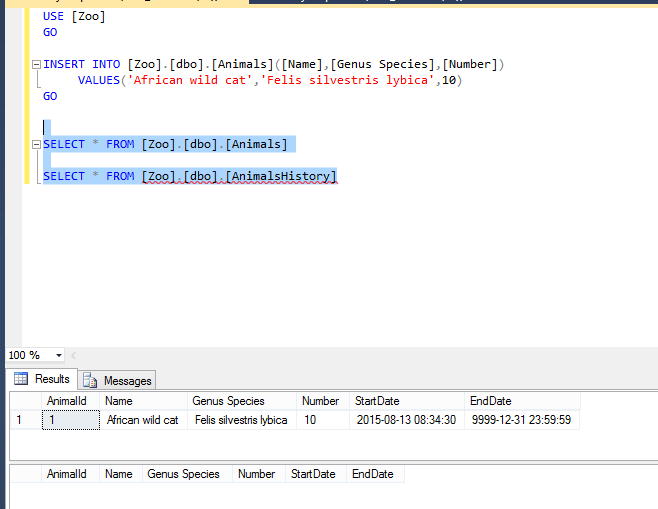
The Insert is like a ‘normal’ insert:
INSERT INTO [Zoo].[dbo].[Animals]([Name],[Genus Species],[Number])
     VALUES('African wild cat','Felis silvestris lybica',10)
GO
I check quickly both tables and I can see that animals has my new row and the History table AnimalsHistory is empty.
Can I insert a row and specified the Start Date?
I test…and the result:
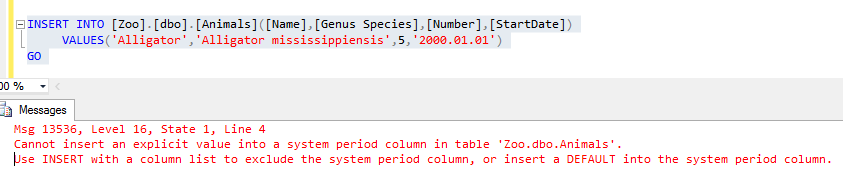
Ooooups! I cannot insert a row with a specific Start Date.
The other way is to add a default value for the Start Date and to insert my line with a constraint:
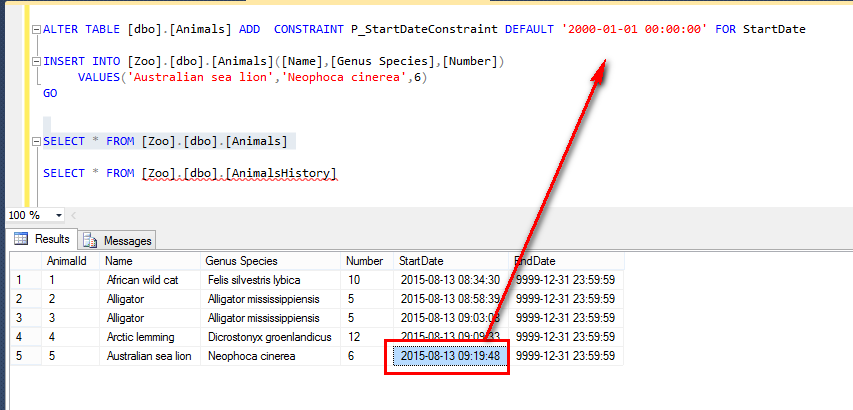
But the result indicates the correct insert date and time, and not my default value.
I precise the default in the Start Date in my next insert:
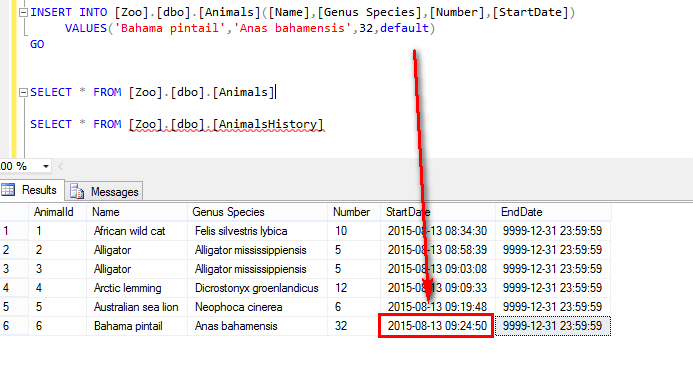
And I have NOT my default Start Date…
A fun thing… that I remark is the Time in my Start Time is delayed from 2 hours. Indeed, the time is set to the UTC Time (documented in the msdn). Don’t forget it when you want be precise to retrieve data in a point in time.
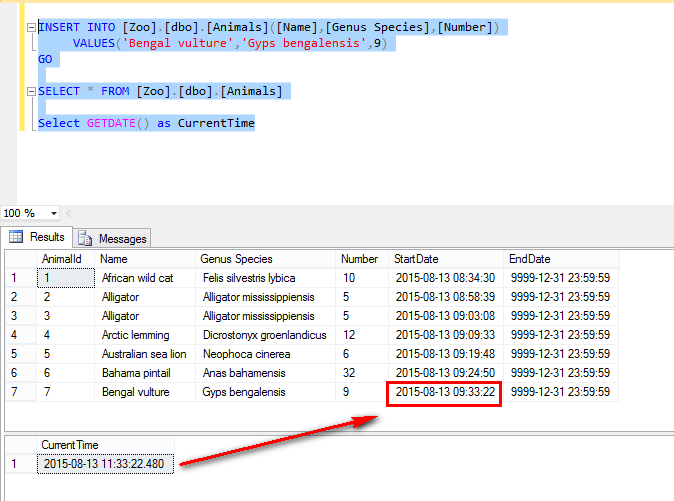
My conclusion for the INSERT is very simple, you can just insert from your actual date and you cannot define your Start Date.
I insert with a script all animals that I wish for my zoo.
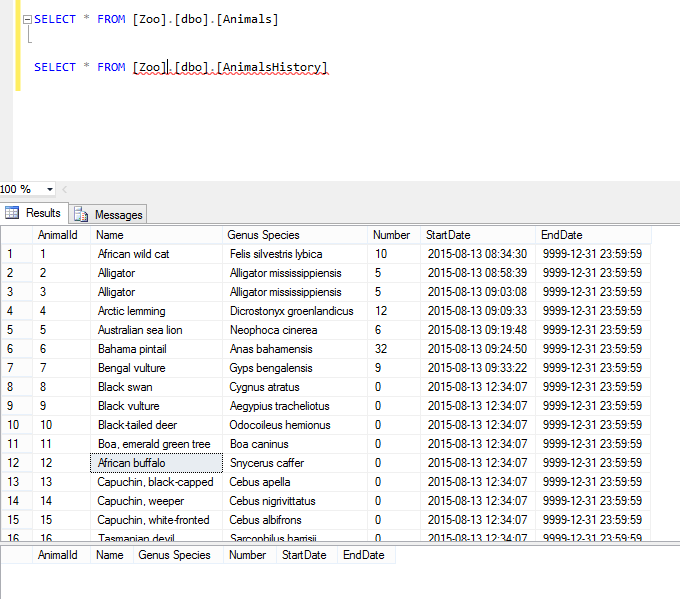
But I must update the number when the species arrived….
UPDATE Command
The update command is like a standard update for your line:
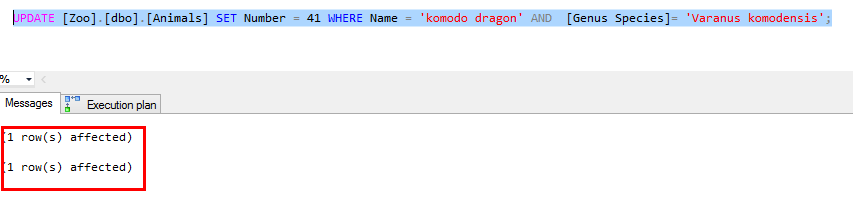
You can notice that the update has 2 rows affected…
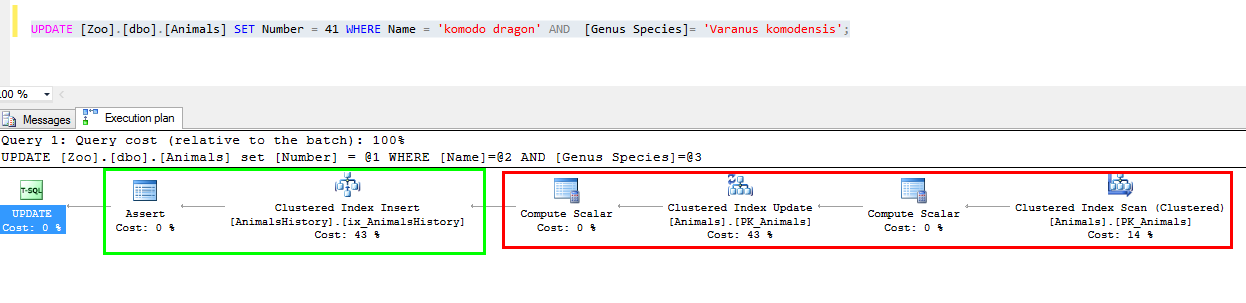
And in the query plan, you can notice that you have a Update of the table Animals and an Insert in the table AnimalsHistory:
To create an update for all lines, I use the command:
SELECT 'UPDATE [Zoo].[dbo].[Animals] SET Number = '+ CONVERT(varchar(10),CAST(RAND(CHECKSUM(NEWID())) * 50 as INT) + 1)
+' WHERE Name = '''+ Name + ''' AND  [Genus Species]= ''' + [Genus Species] +''';WAITFOR DELAY ''00:05'';'
 FROM [Zoo].[dbo].[Animals]
The command “CAST(RAND(CHECKSUM(NEWID())) * 50 as INT) + 1” gives a random number from 1 to 50.
I run all update at different time 5 minutes for all rows with a WAITFOR DELAY ’00:05′;
Then queries are like:
UPDATE [Zoo].[dbo].[Animals] SET Number = 21 WHERE Name = 'African wild cat' AND  [Genus Species]= 'Felis silvestris lybica';WAITFOR DELAY '00:05';
UPDATE [Zoo].[dbo].[Animals] SET Number = 28 WHERE Name = 'Alligator' AND  [Genus Species]= 'Alligator mississippiensis';WAITFOR DELAY '00:05';
UPDATE [Zoo].[dbo].[Animals] SET Number = 32 WHERE Name = 'Alligator' AND  [Genus Species]= 'Alligator mississippiensis';WAITFOR DELAY '00:05';
After a long time, I run a SELECT on both tables:
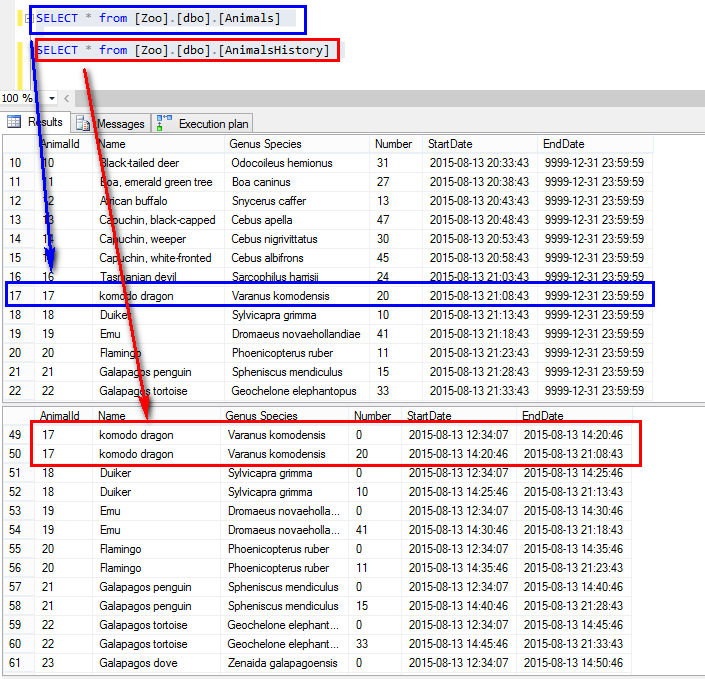
In the table Animals, I have all rows “up to date” and in my history table, I have all old values historicized.
DELETE Command
For the delete, the row is deleted from your table like a standard delete. The value is stored in the History Table with an End Date and Time, when the delete command is running.
In my sample, I have two rows with Alligator and I delete the AnimalID “3”.
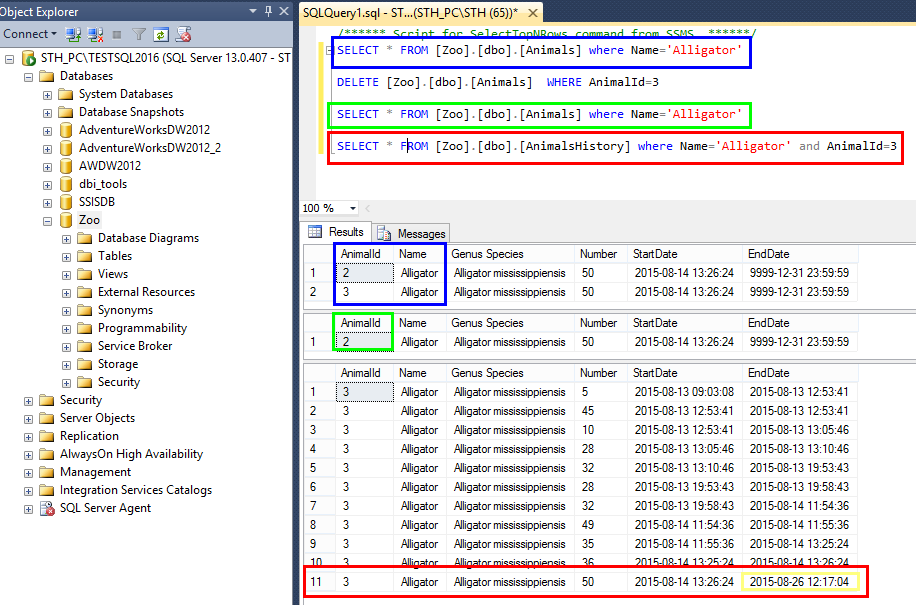
If we have a look on the query plan, we can see both operation (delete on the table and insert on the history table):

Like every time, it is easy to delete 😉
CORE MESSAGE
- It is easy to insert DATA in the table, as it is the classical way.
- But, you cannot force the Start Date and Time.
- The Start Date and Time is set to the UTC Time. Don’t forget to add the Offset when you will select data from a point in time.
- The update is like a standard update and the old value is stored in the Historic table.
- Like the update, delete is like a standard delete, and the value is stored in the Historic table with an End Date and Time when the delete was executed.