

RCSI is an isolation level that lets the SQL Server engine reduce its locking by using an optimistic approach, but it also comes with several trade-offs that you need to take into account:
- the (persistent) version store can fill the space dedicated to it;
- queries that have to walk back through the linked list of versions can take longer, and the more versions they walk, the longer it takes.
While the first point is easy to measure with system views such as sys.dm_tran_persistent_version_store_stats (or sys.dm_tran_version_store_space_usage for the tempdb version store), the second one was very hard to quantify.
But does every query pay for that? That’s what I wanted to check.
A SELECT SUM(v) over a 10,000-row table, under RCSI in Azure SQL Database, with STATISTICS IO on:
Table '[dbo].[t]'. Scan count 1, logical reads 330, physical reads 0, ...
Object '[dbo].[t]'. Tempdb versions read 0, in-row PVS versions read 10000, off-row PVS versions read 210000, online index PVS versions read 0.
This output shows a traditional table scan, but the second line now shows precisely, under the hood, the versions involved during the statement execution! Before this statement, another session had updated the rows I was reading 22 times, in a transaction it had not committed. 10,000 versions were found directly inside the data rows (in-row), but 210,000 previous versions had to be read from the PVS internal table (off-row), and retrieving them took the read from 3 ms to about 117 ms of CPU.
The Object line is new. It comes from the version store read metrics Dimitri Furman announced on the Azure SQL blog last week, which also appear in the actual plan XML returned by the server (SSMS 22.12.0 drops them, both in the graphical plan and in Show Execution Plan XML; copy the XML cell from SET STATISTICS XML ON to see them), in four extended events, in sys.dm_exec_query_stats and its procedure, trigger and function counterparts, and in sys.dm_exec_requests and sys.dm_exec_sessions (Microsoft documentation). For now they exist in Azure SQL Database and SQL database in Microsoft Fabric; Managed Instance and the next SQL Server version are announced to follow.
Questions about your own setup? A dbi services consultant can look at your case.
Talk to an expert (opens in a new tab)Setup
Azure SQL Database, General Purpose serverless (GP_S_Gen5_2, up to 2 vCores), where ADR is always on and RCSI is on by default. One table of 10,000 narrow rows (166 pages):
CREATE TABLE dbo.t
(
    id     int       NOT NULL PRIMARY KEY,
    v      int       NOT NULL,
    filler char(100) NOT NULL DEFAULT 'x'
);
INSERT dbo.t (id, v)
SELECT TOP (10000) ROW_NUMBER() OVER (ORDER BY (SELECT NULL)), 0
FROM sys.all_objects a CROSS JOIN sys.all_objects b;
A reader runs SELECT SUM(v) FROM dbo.t every 2 seconds under the default isolation level. I measure each read by taking version_reads, logical_reads and cpu_time from sys.dm_exec_requests for the current session just before and just after the SELECT.
Case 1: the open transaction does not touch the rows
The forgotten session updates one row in an unrelated table and goes idle:
BEGIN TRANSACTION;
UPDATE dbo.dummy SET x = 1;
-- left open
Meanwhile a writer updates every row of dbo.t 30 times, committing each update, and the reader reads after each one. I ran it once without the forgotten session and once with it:
| Forgotten session | Max version reads per read | Logical reads per read | Avg CPU per read |
|---|---|---|---|
| no | 0 | 329 to 330 | 2.7 ms |
| yes | 0 | 329 | 2.8 ms |
The idle transaction keeps the time horizon frozen and therefore blocks the purge of the version store. To really see it, a session queries the view sys.dm_tran_persistent_version_store_stats every few seconds to see the size of the PVS, in order to observe whether the horizon is really blocked and whether the asynchronous cleaner is really prevented from running. Without the idle session, the PVS went back down from 43,784 KB to 9,160 KB about 20 seconds after the last update. On the other hand, when the horizon is blocked, oldest_active_transaction_id in the system view goes from 0 to a non-zero value, and the size of the version store never goes down until the awaited ROLLBACK, which finally allows all the accumulated versions to be released.
Even though the linked list of versions grew with every update, the read query did not take it into account, because the update was committed before the SELECT accessed the row: the current row was already the right version, so there was no need to look at the older ones.
Case 2: the open transaction updates the rows being read
Now the forgotten session updates the rows the reader reads, 30 times, and never commits:
BEGIN TRANSACTION;
UPDATE dbo.t SET v = v + 1;   -- repeated 30 times, 2 seconds apart
-- no COMMIT
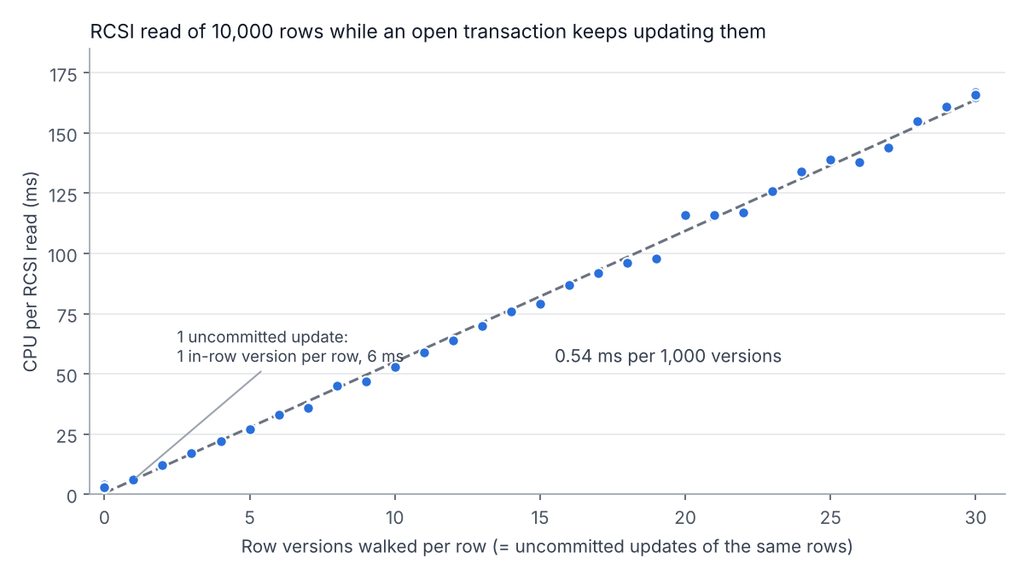
The reader cannot use the row on the page any more, because its value is not committed, so it walks back to the last committed version. Each uncommitted update adds exactly one version per row to that walk: 10,000 version reads after the first update, 300,000 after the thirtieth.
The first time a version was created, it was stored in-row, so the read cost 164 extra logical reads (the rows got wider) and went from 3 to 6 ms of CPU. Each following update is therefore an “off-row” addition, which includes new page reads in the linked list. As each new version is added at a constant rate, walking one more page leads to a constant increase in CPU time (in these tests, 0.54 ms per 1,000 versions, but this value can vary depending on the type and size of the modified data). In the end, the same SUM query as at the beginning went from 3 ms to 167 ms.
What this means for RCSI
Case 2 was deliberately exaggerated and rarely shows up in a real production system. In my opinion, updating a row 30 times without committing makes little sense in an OLTP database while concurrent sessions are trying to read the same data. Usually, a transaction changes each value once, which creates at most one version, so the version can generally stay in-row if there is enough space. The performance cost is therefore very low.
The more telling case is snapshot isolation, which keeps every version it needs because its horizon was frozen at the moment its transaction started. Here, the accumulation is real, because many changes can happen on the same row, and this time every version, even a committed one, has to be walked through the linked list.
In another test with the same table, 30 updates committed one by one on the same 10,000 rows created 30 versions per row, for a total of 300,000 versions to read to get the real value as of the moment the transaction started!
What was already known
This behavior was already known and documented. Here, as I said in the introduction, the improvement is that it is now visible. The following articles had already laid solid groundwork in dissecting how RCSI behaves:
- Sunil Agarwal, Overhead of Row Versioning (2008): walking a list of versions is expensive, and the longer it is, the more it costs.
- Josh Darnell and Forrest McDaniel (Q&A on DBA Stack Exchange, 2019): STATISTICS IO does not count version store reads.
Queries to keep
Which cached statements pay for versions:
SELECT TOP (10)
       qs.total_version_reads,
       qs.execution_count,
       qs.total_logical_reads,
       qs.total_worker_time,
       SUBSTRING(st.text, qs.statement_start_offset / 2 + 1,
                 (CASE qs.statement_end_offset WHEN -1 THEN DATALENGTH(st.text)
                       ELSE qs.statement_end_offset END - qs.statement_start_offset) / 2 + 1) AS statement_text
FROM sys.dm_exec_query_stats AS qs
CROSS APPLY sys.dm_exec_sql_text(qs.sql_handle) AS st
ORDER BY qs.total_version_reads DESC;
Whether something is holding version cleanup:
SELECT persistent_version_store_size_kb, oldest_active_transaction_id
FROM sys.dm_tran_persistent_version_store_stats
WHERE database_id = DB_ID();
If version reads are high on a few statements, look for a transaction that keeps modifying the rows they read, or for a long snapshot transaction. Otherwise, if version reads stay near zero while the PVS keeps growing, it’s only a storage matter and your readers are fine for now.
Dimitri Furman asks whether version reads should be added to Query Store. For me, having these numbers is particularly important, because as we saw throughout this article, the number of versions walked can change the execution time, and this number can change depending on when the query runs. That’s why it is essential to have the whole context around an execution to analyze it properly.
Reproducing it
Two sessions on the same Azure SQL Database (GP_S_Gen5_2, November 2026, default settings), the table from the setup above, recreated before each test. Each read is measured like this:
SELECT @vr0 = version_reads, @lr0 = logical_reads, @cpu0 = cpu_time
FROM sys.dm_exec_requests WHERE session_id = @@SPID;

SELECT @s = SUM(v) FROM dbo.t OPTION (MAXDOP 1);

SELECT version_reads - @vr0, logical_reads - @lr0, cpu_time - @cpu0
FROM sys.dm_exec_requests WHERE session_id = @@SPID;
Then, create a loop that updates the whole table 30 times and waits 2 seconds between each iteration. For case 1, add a COMMIT after the UPDATE, and don’t for case 2. After each iteration, run the SUM query and collect information from the PVS using sys.dm_tran_persistent_version_store_stats.